AI content reviews for WordPress

Score every post. Know what to fix next.

As a blog grows, older posts quietly fall behind your best work. Post Quality Manager scores every post with AI, inside WP Admin, and ranks what to fix next.

Pre-release. The button opens your email app: one email when it's installable, then your address is deleted. Or write to hello@postquality.com.

  • Runs on your own n8n and Anthropic key
  • Your posts go only there
  • Free plugin, no license needed
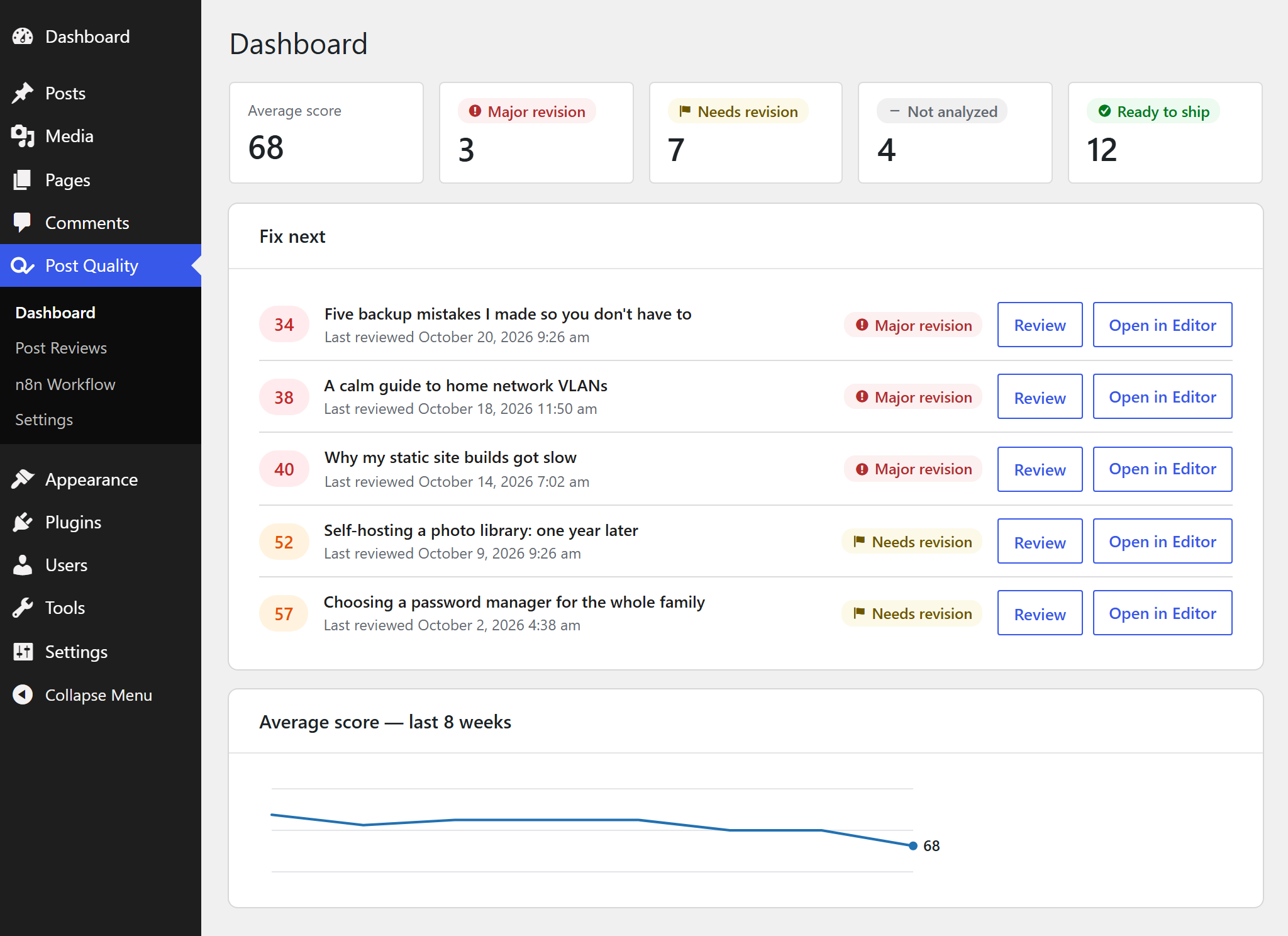
The Post Quality Dashboard in WP Admin: average score 68; 3 posts in Major revision, 7 in Needs revision, 4 not analyzed, 12 ready to ship; a Fix next list led by a post scored 34.
The Dashboard in WP Admin. Demo posts, fictional scores.

What a review looks at Four pillars, any niche

  • Structure
  • Readability
  • Engagement
  • Credibility

Every post is scored on the same four pillars, then you get the edits that matter most. Your niche comes in through a Blog Profile and your Editorial Standards, not through code.

A review in Post Reviews: score 70, Needs revision; pillar scores Structure 68, Readability 74, Engagement 59, Credibility 81; three top edits, the first: open with the reader's problem.
A review in Post Reviews. Fictional post.

Before you install What you need

Post Quality runs on your own accounts, so you hold the keys. Check these three first.

  • Your own n8n

    The workflow tool your reviews run in. Self-hosted; your site and n8n must reach each other. No n8n yet? How to get n8n.

  • An Anthropic API key

    The setup guide checks it once and stores it in n8n, never in the plugin.

  • Your own AI bill

    You pay Anthropic per review, at most $0.05 on the default model, and your n8n hosting. Cap it with a spend limit in your Anthropic account. What it costs.

  • WordPress 6.6+
  • PHP 8.0+
  • Single site, no Multisite

A good fit if you run your own WordPress and can follow a setup guide for n8n. Not a fit if you want a hosted service with nothing to set up.

How it works Three steps to your first score

  1. Connect your accounts

    The setup guide asks for three values: your n8n address, an n8n API key and your Anthropic key. It builds the workflow and tests the connection both ways.

  2. Review a post

    Click Review on a post, or select several at once. Your site sends each one to your own n8n workflow, which asks Anthropic's models.

  3. Fix what matters first

    The score, the issues and the suggested edits come back into WP Admin. The Dashboard ranks what to fix next.

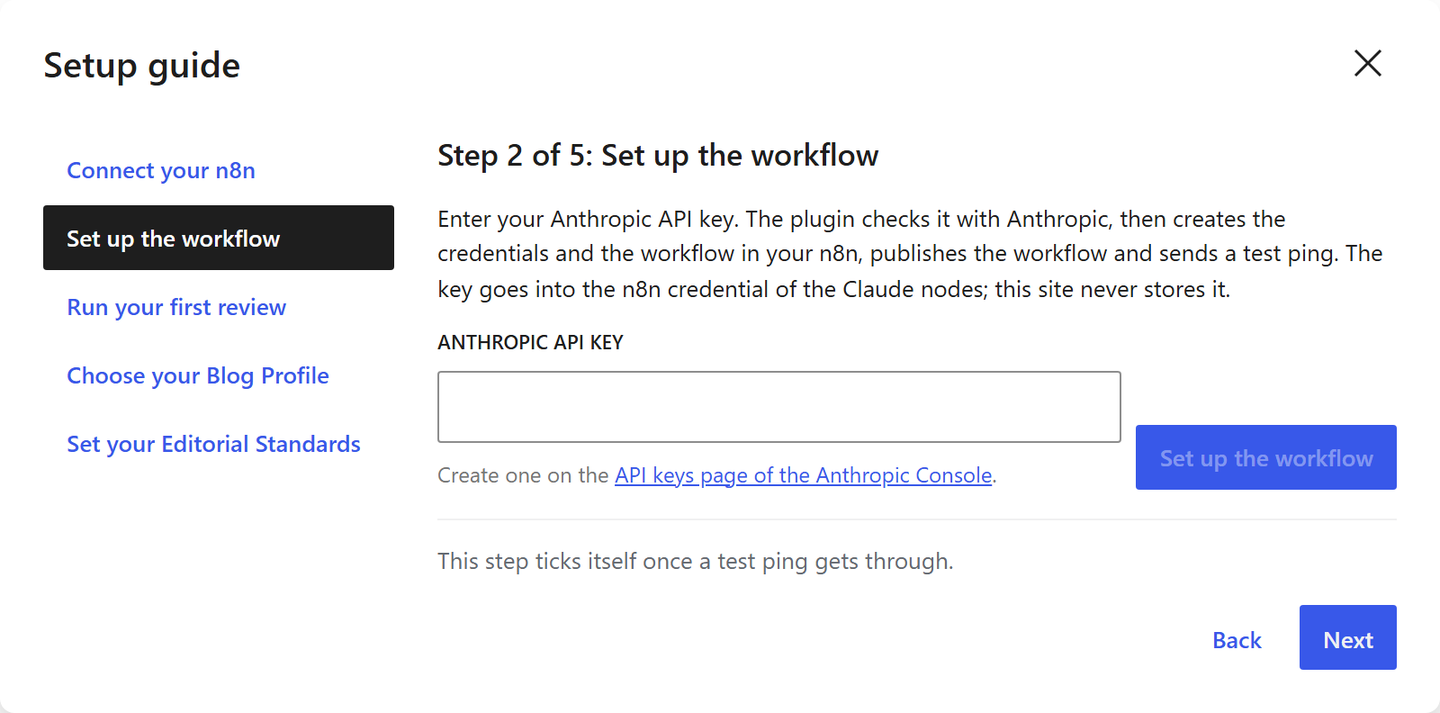
The Post Quality setup guide at step 2 of 5, Set up the workflow, its five steps listed beside it: Connect your n8n, Set up the workflow, Run your first review, Choose your Blog Profile, Set your Editorial Standards. The Anthropic API key field is empty.
The setup guide's second step: your Anthropic API key. The first asks for your n8n address and an n8n API key.
  1. Your site
  2. Your n8n workflow
  3. Anthropic's models
  4. Back in WP Admin

Your posts go only to your own n8n and, through it, to Anthropic. Privacy.

Free and Pro Start free. Pro adds the agents and the automation.

Pro

49 per year, 1 site,
USD, EUR or CHF

99 for 5 sites, 199 for unlimited sites. Plus VAT or sales tax where it applies.

  • Everything in Free
  • Rewrite, Sources, SEO and Audit agents
  • Per-agent model and instructions
  • Automated Reviews on a schedule
  • Roles: what each role may do
  • Email support within 5 business days
See Pro pricing

On sale with the first public release.

  • 14-day money-back guarantee

    Full refund within 14 days of buying or renewing, no questions asked. Freemius handles checkout, tax, invoices and refunds.

  • Nothing deleted if Pro ends

    Your site returns to Free. Reviews, settings, schedules and role rights stay.

Hear about it once.

One email when the free plugin is installable, then your address is deleted. No newsletter, no follow-up.

Opens your email app.

Built by the author and used on real blogs.